Automatic replies for Douyin comments

Replies whileyou’re away

Software on your own computer. Once enabled, it reads new comments, matches the answers you wrote and sends replies automatically. Unmatched, sensitive or uncertain content is skipped by default. You can turn it off at any time.

Free download · New users: macOS Apple Silicon · License key required for core features
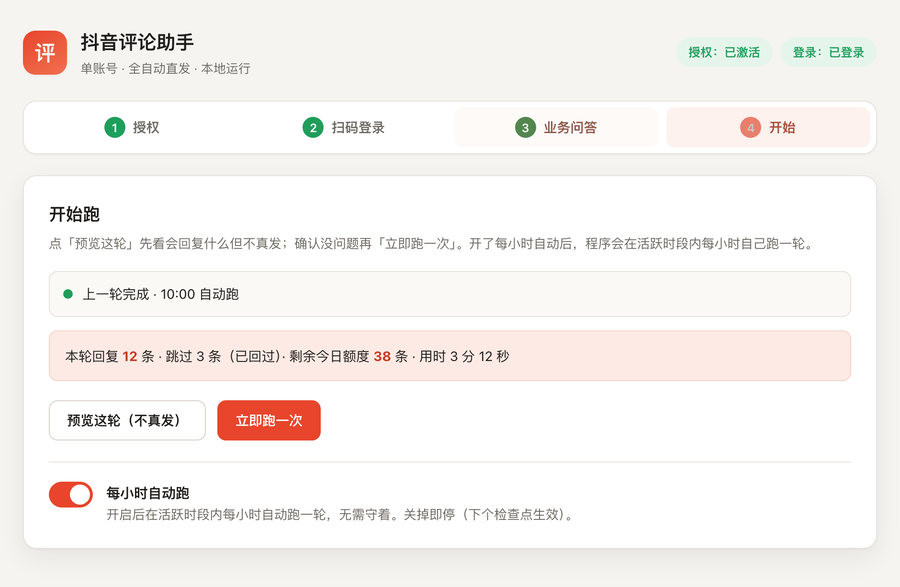
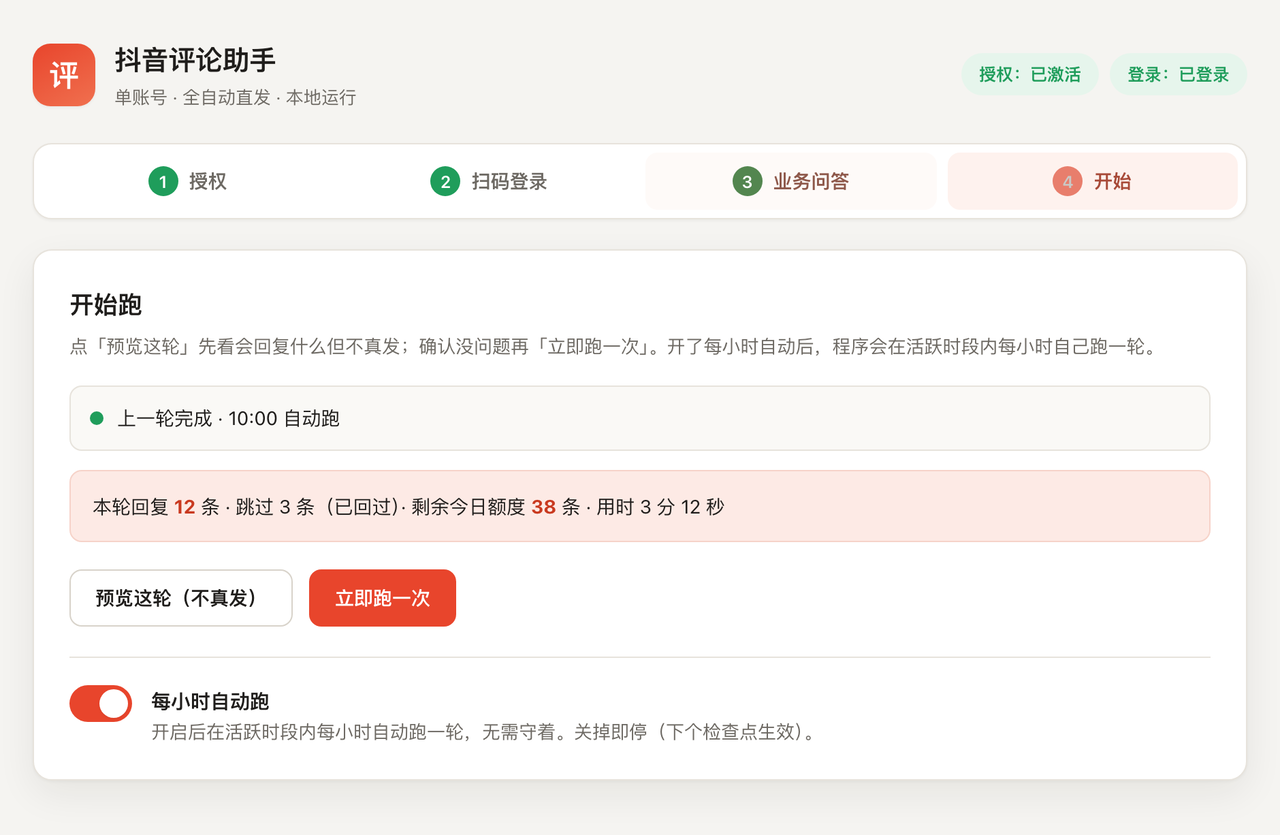
Zhike running: 12 replies this round, 3 skipped, 38 remaining in the daily allowance

Product screenshots show the original Chinese interface.

How can I buy this? Open to brand partnerships? Is it beginner-friendly?
6–15 sDefault reply interval
50 repliesDaily limit
9–22 hWorking hours
0 repliesComments sent to our servers
Scroll to see how it works
01 Missed comments mean missed customers

No reply, interest fades

A
Price enquiries go unanswered
“How much?” and “How do I buy?” pile up in the comments. By the time you reply, the customer has left. People asking about prices are often the most interested—and the quickest to lose interest.
B
No one there at night or when you are busy
When you are asleep or busy, comments go unanswered and interest fades.
C
Hiring support is expensive
Thousands of yuan a month, with no guarantee that every comment gets a reply.
D
Slow replies can cost you reach
Weak engagement can mean less reach. As attention fades, fewer people see the content, making the gap harder to recover.
02 Get started in four steps

A few clicks, no code needed

STEP 01

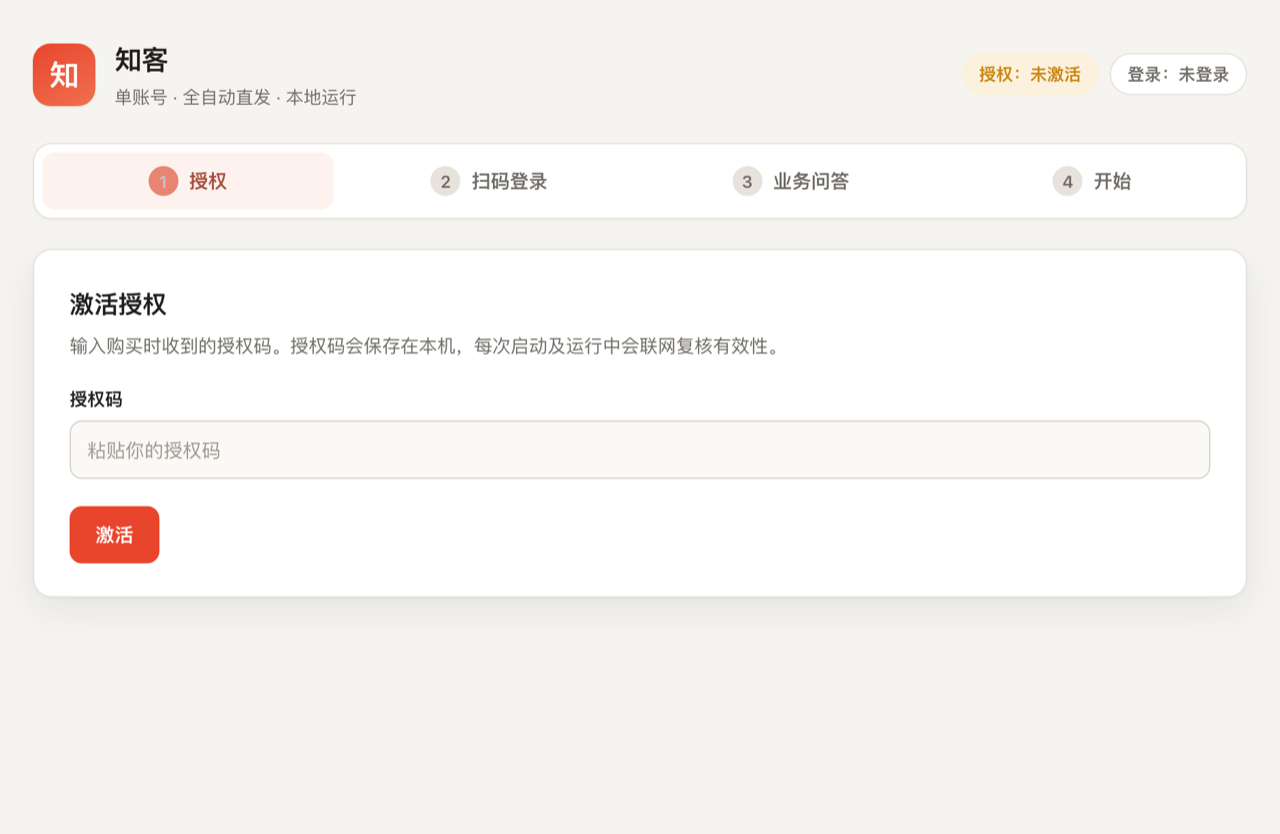
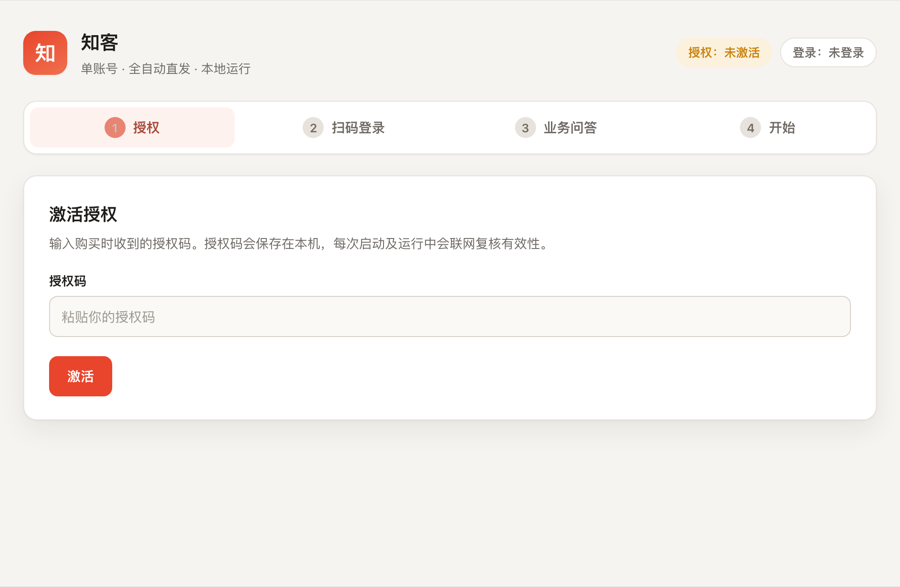
Activate, then scan to sign in

Paste the license key you received at purchase, then scan the QR code with the mobile app to sign in to your own platform account. The session stays on this computer. Online checks at activation, startup and periodically during use verify expiry, device binding and revocation. During operation, status updates can take up to about one hour.

Zhike · License activation screen
STEP 02

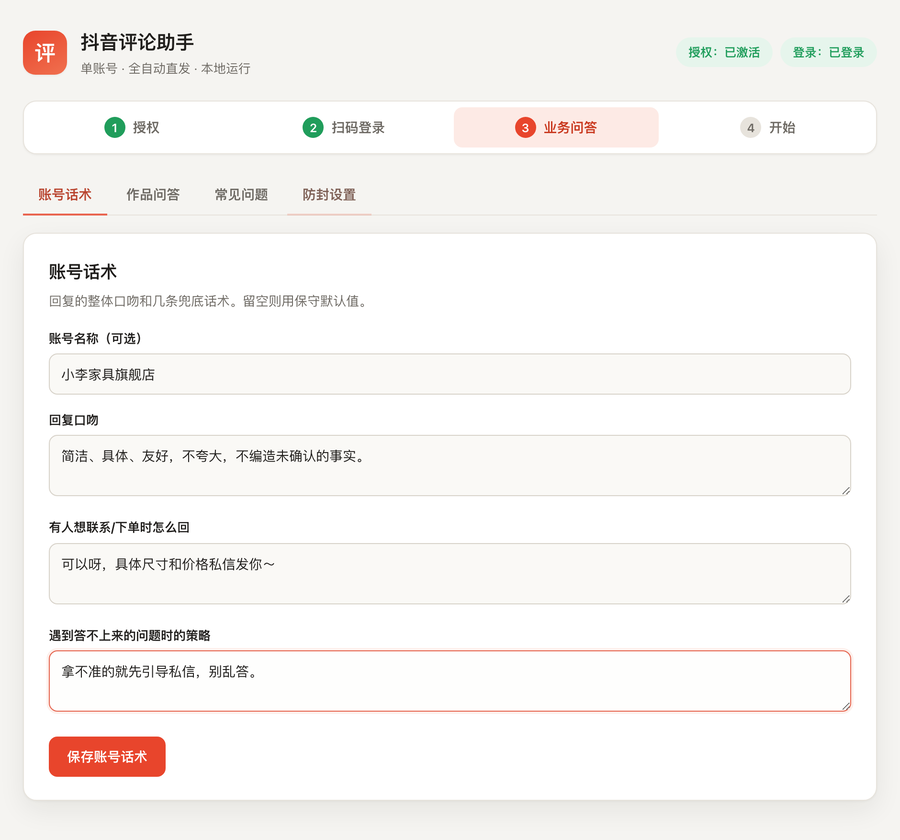
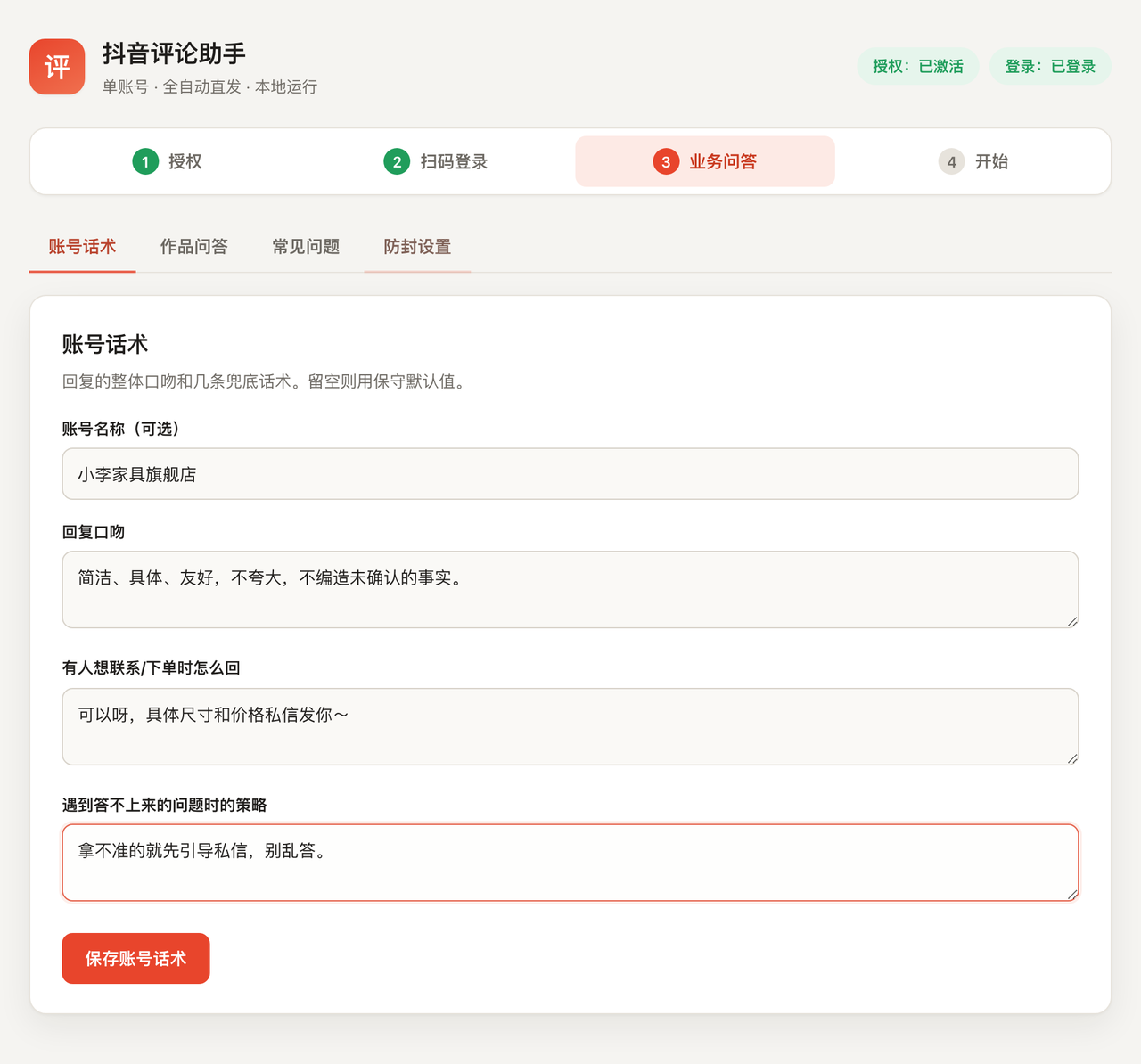
Add your business Q&A

Add account replies, per-video Q&A and common questions. More detail makes for a better match. Replies come only from this content; no new answers are generated.

Zhike · Account replies and business Q&A
STEP 03

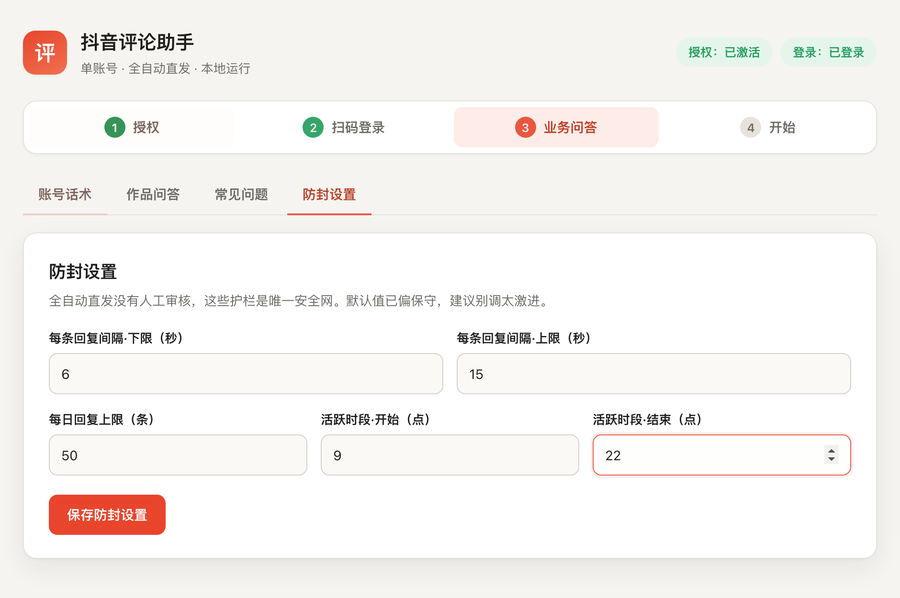
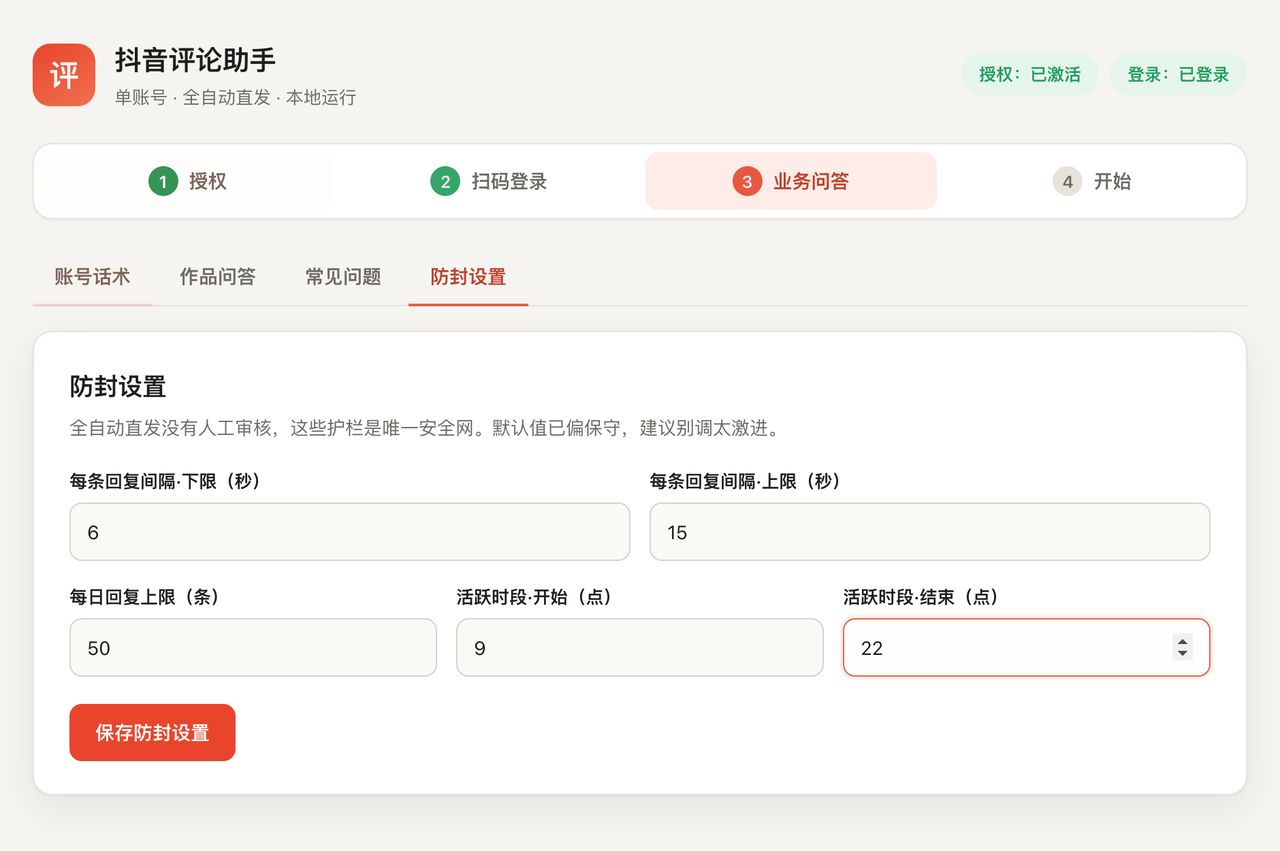
Set your limits

Set the reply interval, daily cap and active hours once. Automated replies always follow these limits, with conservative defaults already in place.

Zhike · Risk-control settings
STEP 04

Start automatic replies

Enable hourly automatic checks to continuously authorize matching and sending under your rules, with no approval needed for each batch. You can also run a single automatic cycle now. Uncertain, sensitive, promotional and unmatched comments are skipped by default. Turn the switch off at any time.

Zhike · Running screen
Zhike · License activation screen Zhike · Account replies and business Q&A Zhike · Risk-control settings Zhike · Running screen
03 Replies from your knowledge base

Write your answers once. Zhike uses them.

Configure your account voice, per-video answers and FAQs in the browser. Replies are matched only from what you wrote—no external language models, no invented answers. If nothing matches, Zhike skips the comment.

Comment: “How much is this?”IN
Match your configured keywordsMATCH
Send the answer you wroteREPLY
No match · Sensitive · PromotionalSKIP
Contact-request repliesUsed for clear requests to get in touch
Per-video answersDifferent answers for different videos
Frequently asked questionsSet up common answers once
When in doubt, skipOnly configured answers—no forced replies
Actual Zhike interface View full-resolution screenshot ↗
04 Limits for automated replies

Your replies, your pace

6–15 s
Random interval
Choose the pause between replies.
50 replies
Daily limit
Set a daily reply cap, counted across all runs.
9–22 h
Active hours
Reply only during the hours you choose.

Please note: All three limits can be adjusted in the risk-control settings. Defaults are conservative; check the app for the exact values. These settings can reduce the chance of triggering platform controls, but theycannot eliminate platform risk. Any automation may violate platform rules, and the platform may impose restrictions under those rules. Use settings appropriate for your account.

Actual Zhike interface View full-resolution screenshot ↗
05 Features · Help with your comments

The essentials, right on your computer

Automatic replies in your own words

New comments are automatically matched against your knowledge base and answered. Unmatched, sensitive or uncertain content is skipped by default. Timing and frequency follow your configured limits, and results are recorded in the send log.

Runs locally, without cloud language models

Sessions, business Q&A and send logs stay on your own computer. Reply matching runs locally, without external AI APIs, keeping costs down and data close to you. License verification requires a network connection.

Set your own reply pace

Adjust reply intervals, daily limits and active hours. Defaults are conservative.

Replies from your knowledge base

Answers come only from the content you enter. No new replies are generated.

Skip uncertain comments by default

Unknown, sensitive, promotional and abnormal content is skipped by default. The current product does not read or store direct messages.

06 Download · Activate with a license key

Download. Activate. Then get started.

The package is publicly downloadable, but core business features require a valid license key. Before activation, only startup diagnostics, license status and activation, and local business-data export and deletion are available. Licenses are time-limited; the exact term and plan are specified in your order.

macOS · Apple Silicon
v2.1.721.3 MB
  • Unzip and double-click the file named 启动.command; everything else happens in the browser
  • First launch installs pinned dependencies and Chromium; an internet connection is required
  • Business data stays on your computer by default, without being sent to the license server or external language models
  • Sending stops at the exact license expiry time; validity is checked again before each comment is submitted to the platform
Download for macOS
Zhike v2.1.7 SHA-256 b238b2608b2a8fd0065b3d1fdfae930b1d3616add2be8a438db0477bb5629d33 Checksum file
Downloading does not grant a license. The same package is also available on GitHub Release .
Windows x64 · Legacy recovery
v2.1.022.8 MB
  • Windows v2.1.0 is only for restoring an already activated installation on the same device
  • First-time activation on new Windows devices is currently unavailable
  • New-user access will reopen after Windows v2.1.3 passes testing on physical hardware
Download Windows legacy for existing users
Do not buy a Windows license for a new device. Existing users planning to switch computers should first contact us.
07 Before you buy

FAQ

Still have a question?
Email us with your account setup and intended use for a practical answer. You can also download the package first to try the available features.
How do I download and install it?
New users should download macOS v2.1.7, unzip it and double-click the file named 启动.command. Windows v2.1.0 is retained only to restore an already activated installation on the same device; new-device activation is unavailable. Initial environment setup requires an internet connection.
Why do I need a license key after downloading?
The package is publicly downloadable, but core business features require a valid license key. Before activation, only startup diagnostics, license status and activation, and local business-data export and deletion are available.
Do I need to know how to code?
No. Double-click to launch, then finish setup with a few clicks in the browser.
Does it support Windows?
The legacy Windows v2.1.0 package can restore an already activated installation on the same device. First-time activation on new devices is unavailable. Please do not purchase a Windows license for a new device until Windows v2.1.3 passes testing on physical hardware.
Are my account details and data uploaded?
Platform sessions, business Q&A, comment-processing records and send logs stay on your computer by default, without being sent to the license server or external language models. Temporary comment plans are deleted after 30 days. Finalized or expired review batches have their original text redacted after 30 days and are deleted after 90 days. The license key, product ID and device ID are periodically sent to the license server for verification. The app also connects directly to Douyin and first-time installation download sources.
Could this affect my account?
You can adjust frequency, intervals and active hours; defaults are conservative. Any automation may violate platform rules and carries platform risk, including restrictions imposed by the platform. Start with the defaults, avoid aggressive settings and check results regularly.
How many accounts can I manage?
It depends on your license plan: one account on the single-account plan, or up to three on the multi-account plan. Sessions, settings, quotas and send logs are isolated for each account.
How accurate are the replies?
Replies are matched only from the business Q&A you enter; no new answers are generated. Unmatched, sensitive or uncertain comments are skipped by default. Keywords can still match incorrectly, so write precise answers and check the comments and send log regularly.
Can I get a refund?
This is a digital product. Activated license keys are generally non-refundable; unactivated keys may be refunded within 7 days of purchase. If a feature is not working, contact us first so we can investigate. Statutory refund rights under applicable consumer-protection rules remain in effect. See the License & service terms for details.
For your comments, keep replies moving

Local software for macOS Apple Silicon, currently supported for new users. Double-click to launch, set your answers and limits, then let it check, match and send automatically.

macOS Apple Silicon · Windows legacy for activated devices only · Business data stays local by default
LicenseLicense key · Fixed license term
Accounts1 account / up to 3 on the multi-account plan
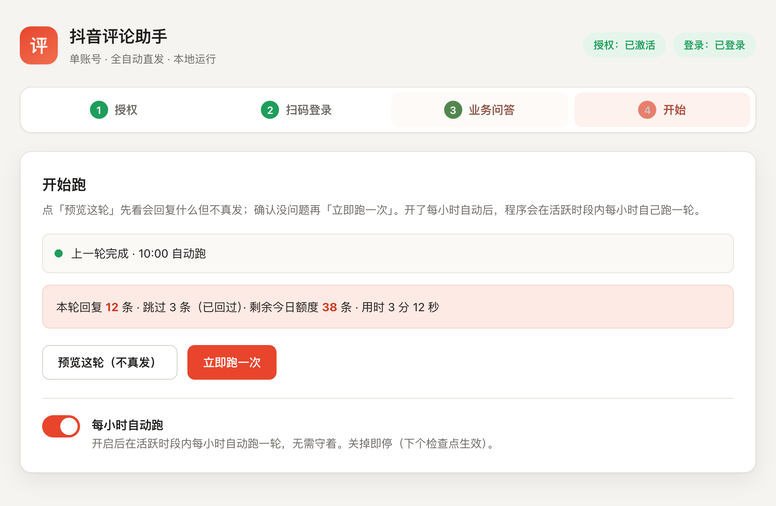
Original product screenshot Zhike product screenshot